For decades, spreadsheets like Excel have been a go-to tool for tracking school assets. They’re familiar, inexpensive, and flexible, making them an easy starting point for districts that need a basic way to record equipment purchases and locations. In many cases, spreadsheets have served schools well for years.
However, as districts grow and technology footprints expand, spreadsheets begin to show their limitations. Managing thousands of assets across multiple schools, departments, and funding sources introduces complexity that spreadsheets were never designed to handle. Version control issues, manual data entry, and limited visibility quickly turn asset tracking into a time-consuming and error-prone process.
Modern asset management software solves problems that spreadsheets simply cannot. From real-time visibility to reduced manual error, purpose-built software enables districts to manage assets more efficiently, accurately, and strategically. Here’s a closer look at what asset management software provides that spreadsheets can’t.
1. Real-Time, Multi-Campus Visibility
Spreadsheets:
Spreadsheets typically live on a single computer, shared drive, or are emailed between staff. Even when cloud-based, they represent a static snapshot in time. By the time a principal, IT director, or finance administrator opens the file, the data may already be outdated. Assets may have been moved, reassigned, repaired, or retired without anyone updating the spreadsheet.
Software:
Asset management software provides real-time visibility across all campuses and departments. As soon as an asset is moved, checked out, or updated, the information is reflected system-wide. Administrators can instantly see where an asset is located, who is responsible for it, and its current status, without tracking down multiple files or relying on memory. This level of visibility is especially critical for districts managing multiple schools, shared equipment, or mobile technology programs.
2. Automated Data Capture and Barcode Scanning
Spreadsheets:
Spreadsheets rely heavily on manual data entry. Serial numbers, locations, and tag numbers must be typed in by hand, increasing the likelihood of typos, inconsistencies, and duplicate records. Tracking hundreds or thousands of laptops, musical instruments, or AV carts becomes overwhelming and difficult to maintain accurately over time.
Software:
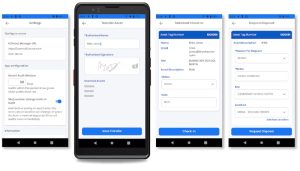
Asset management software supports barcode scanning, dramatically simplifying data capture. Staff can scan an asset using a mobile device or scanner to instantly pull up or update its record. Each scan reduces human error and creates a reliable audit trail that links assets to specific locations, users, or departments. Over time, this automation saves countless staff hours while improving data accuracy.
3. Built-In Audit Trails
Spreadsheets:
When multiple people access the same spreadsheet, tracking changes becomes difficult. It’s often unclear who edited a record, what was changed, or why. During audits, districts may struggle to explain discrepancies or prove asset accountability, especially if records have been overwritten or lost.
Software:
Asset management software automatically logs many actions taken within the system. Each update is time-stamped and tied to a specific user, creating a clear audit trail. Districts can easily demonstrate compliance, answer auditor questions, and resolve discrepancies with confidence. This built-in accountability not only simplifies audits but also reinforces responsible asset stewardship across departments.

4. Role-Based Access and Security
Spreadsheets:
With spreadsheets, access is often all-or-nothing. Anyone who can open the file can edit it, intentionally or accidentally. This creates risk, particularly when sensitive data or asset values are involved. Files can also be deleted, overwritten, or shared improperly, leading to data loss or security concerns.
Software:
Asset management software uses role-based permissions to control access. Finance, IT, facilities, and school administrators can each view and update only the information relevant to their responsibilities and sites. Combined with secure cloud hosting, regular backups, and user authentication, software protects sensitive data while maintaining transparency and accountability throughout the district.
5. Automated Reporting and Analytics
Spreadsheets:
While spreadsheets store data, they offer limited insight without significant manual effort. Generating meaningful reports requires complex formulas, pivot tables, and time, which are resources that many district staff simply don’t have. As a result, asset data often goes underutilized.
Software:
Asset management software transforms raw data into actionable insights. Built-in dashboards and reports allow leaders to quickly view asset counts, values, age, condition, and distribution across schools. Customized reports can be generated on demand for budgeting, planning, and audits. With better visibility into asset trends, districts can make smarter, data-driven decisions.

6. Handling High-Volume, High-Mobility Assets
Spreadsheets:
Assets that move frequently, such as student devices, cameras, or shared instructional equipment, are difficult to track in spreadsheets. Each move requires a manual update, and missed entries quickly lead to inaccuracies. Over time, this results in “lost” assets that are simply unaccounted for.
Software:
Asset management software is designed to handle movement. Assets can be reassigned or checked out in seconds, and their history remains intact. Alerts can notify staff when items are overdue or assigned incorrectly, reducing loss and improving accountability. This is especially valuable for 1:1 device programs and shared resources.
7. Scalability as Districts Grow
Spreadsheets:
Spreadsheets may work for a few hundred assets, but performance and usability decline as data grows. Multiple versions of the same file create confusion, and managing assets across new campuses or programs becomes increasingly difficult.
Software:
Asset management software scales effortlessly. Whether a district adds new schools, expands technology initiatives, or consolidates campuses, the system adapts without added complexity. Growth doesn’t require reinventing processes or rebuilding files—everything remains centralized and organized.
8. Integration With Other District Systems
Spreadsheets:
Spreadsheets operate in isolation. Asset data must be manually copied between systems, increasing workload and the risk of mismatched information.
Software:
Asset management software integrates with other district systems such as Google, PowerSchool, and Infinite Campus. These integrations create a single source of truth for asset data, reduce duplicate entry, and ensure consistency across departments. The result is improved accuracy, time savings, and stronger compliance.
Conclusion
While spreadsheets have served districts for decades, they can no longer keep pace with the complexity of modern K–12 asset management. Asset management software delivers capabilities that spreadsheets simply cannot match, including real-time visibility, automation, security, analytics, and scalability.
Districts that adopt software move beyond reactive tracking to proactive asset management. They reduce errors, save staff time, make better data-driven decisions, and approach audits with confidence. For K-12 schools managing thousands of assets across multiple campuses, the choice is clear: asset management software is no longer optional—it’s essential.